Jul 16, 2026-Reviews
Tools Berry Review - Tax Math That Shows Its Work
We've tested Tools Berry, a free set of state paycheck calculators and 2025 tax-law tools that run entirely in your browser and show their working.
Welcome to this Tools Berry (tools-berry.com) review ✨
Search for a paycheck calculator and you land in one of the worst neighbourhoods on the internet. Half the results are lead-generation funnels that want your email before they'll show a number. The other half are content farms running on tax tables somebody copied in 2019 and never touched again. You type your salary into a box, you get a number, and you have no idea whether the number is right or where it came from.
Tools Berry is a free utility site going after that gap: paycheck calculators for all 50 states plus DC, a set of calculators for the new 2025 tax-law deductions (overtime, tips, car loan interest, the SALT cap), and a long tail of unit converters and everyday tools. It's built and maintained by one person, Edmond Daher, and the whole thing runs client-side.
Edmond asked me to look at three things in particular: whether the privacy claim actually holds up, whether the per-state tax data is genuinely sourced rather than generic, and whether the plain-English explanations make this usable for people who don't speak IRS. I went through all three hands-on, opened the browser's network panel, and read the calculation engine. Here's what I found.

Getting Started & First Impressions
There is no getting started, which is the point. No account, no email gate, no cookie wall demanding you accept twelve vendors before you can see a number. You open a page and the calculator is already populated with a default salary and already showing a result. You change the number and the result moves as you type.
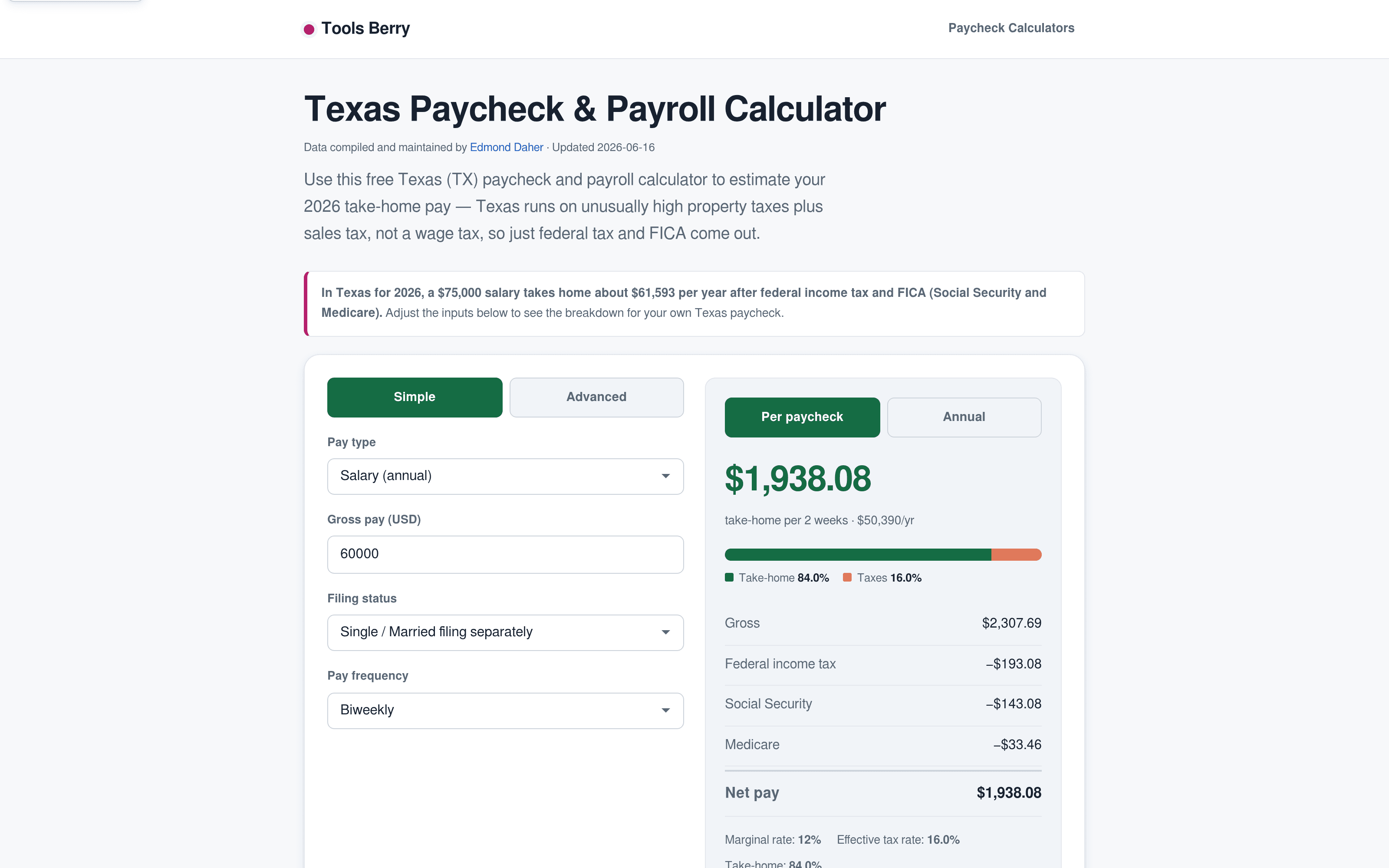
The first thing I checked was the "paycheck calculator Texas" page, since that's the exact query this kind of site lives or dies on. A $75,000 salary in Texas nets about $61,593 a year, and the page tells you why in a sentence: Texas runs on property and sales tax rather than a wage tax, so only federal tax and FICA come out. Every state page carries a byline ("Data compiled and maintained by Edmond Daher") and an updated date. Small thing, but it's more provenance than most of the competition offers.
The state paycheck calculators, and whether the data is real
I checked all 51 state pages programmatically. All 51 return a real page, which already puts it ahead of the repo's own README (which still claims 24 states, and contradicts itself further down — the site has run well past its own documentation).
More interesting is what happens on the three that aren't ready. California, Nebraska and Oklahoma each carry a banner saying "2025 rates (2026 pending)", explaining that the state hasn't published its 2026 brackets yet and the page will update when it does. That's the opposite of what a content farm does. A content farm would quietly serve last year's numbers under a 2026 headline and hope nobody checks. Showing the stale-data banner costs you nothing but honesty, and it's the single clearest signal on the site that the tax data is being maintained by someone who cares whether it's right.
The California page is a good stress test of the "sourced, not generic" claim. It gives you the nine-bracket ladder from 1% to 12.3%, notes that the top rate bites above $742,953, states the California standard deduction ($5,540 single, $11,080 joint), and then lists what it deliberately doesn't model: the 1% Behavioral Health Services Tax surcharge above $1M, personal exemption credits, dependent credits, itemised deductions. It cites the Tax Foundation, California's DIR and EDD, the Census Bureau, the IRS and the SSA at the bottom.
The state-conformity notes are where this really shows. Pick Alabama on the overtime calculator and you don't get a vague "check your state" — you get HB 527, signed April 16 2026, allowing a capped state deduction of up to $1,000 of qualified overtime for 2026–2028, plus a note that Alabama's own earlier full exemption ended June 30 2025. That is not a figure anyone generates by accident.
My favourite detail on these pages is the expander labelled "How your federal tax is calculated, bracket by bracket." Open it and you get an actual table: 10% on the first $12,400 ($1,240), 12% on the next $31,500 ($3,780), with a line underneath telling you your taxable income is $43,900 after the $16,100 standard deduction and that your marginal rate is 12% because that's the tax on your next dollar. Most calculators hand you a number and ask you to trust it. This one shows its working, and the arithmetic reconciles exactly with the headline figure.

There's also an Advanced mode that adds 401(k)/403(b) contributions, HSA/FSA and health premiums, dependent and W-4 credits, extra federal withholding, and post-tax deductions. Reading the engine, it handles the subtle part correctly: a 401(k) contribution comes out of income tax but not FICA, while Section 125 money comes out of both. It also models the 0.9% additional Medicare tax above $200,000, which plenty of free calculators skip.
The 2025 tax-law calculators
This is the part of the site with the clearest reason to exist. The One Big Beautiful Bill Act created several temporary deductions for 2025–2028 that are widely misunderstood, mostly because they were marketed as "no tax on overtime" and "no tax on tips" when they are neither.
The overtime tax calculator 2026 gets the framing right immediately: only the premium qualifies, the extra half of time-and-a-half. If you make $20 an hour and $30 on overtime, only the $10 difference counts. It says so in the field label, in the explainer, and in a worked example about a warehouse worker named Marcus that walks through the whole thing in four steps and lands on "$360 arrives as a bigger refund, and your paychecks during the year don't change." That last point is the one everybody gets wrong, and it's repeated in a callout next to the result.
I pushed it into the phase-out to see whether it was real. Enter $200,000 of income against a $12,500 premium and the tool flags in amber: "Reduced by income phase-out: yes — cap lowered to $7,500." That's the $100-per-$1,000-over-$150,000 taper, correctly applied, with the resulting $1,800 saving at a 24% marginal rate. It's implemented, not just described in the FAQ.

The tip income tax calculator is quietly more sophisticated than it lets on. Enter $45,000 of income including $18,000 of tips and it reports a $2,130 federal saving at a "11.8%" rate. That 11.8% isn't a bracket — it's the effective rate of the deduction, because $18,000 of deduction straddles the 12% and 10% bands. I checked it by hand: tax on $28,900 of taxable income is $3,220, tax on $10,900 is $1,090, and the difference is exactly $2,130. It's doing a real recompute rather than the marginal-rate shortcut most calculators use, and it's more accurate as a result.
The SALT cap calculator does the thing I wanted it to do, which is answer "what did the change actually get me." It handles the $40,000 cap for 2025 and $40,400 for 2026, notes the 1%-a-year climb through 2029 and the reversion to $10,000 in 2030, and then compares itemising against your standard deduction rather than assuming you itemise. Feed it $48,000 of SALT paid at $300,000 of income and it tells you $40,000 is deductible, $8,000 isn't, that itemising wins at $50,000 against a $15,750 standard deduction, and that you're $10,313 better off than under the old cap.
The car loan interest deduction calculator runs an amortisation rather than asking you to know your interest: a $40,000 loan at 6.50% over 60 months gives a $782.65 monthly payment and $2,393.96 of interest in year one, of which the full amount is deductible below the $100,000 threshold. It also flags a subtlety the other two calculators don't share — married filing separately is allowed here, unlike the tips and overtime deductions — and notes the cap isn't indexed for inflation.

Every one of these pages ends with sources (IRS Notice 2025-69 on the overtime page, for instance), a plain-English FAQ that defines MAGI and FICA and filing status without assuming you know them, and cross-links into a small tax glossary of about fifteen terms. The glossary is modest but it's written properly — the entry for itemising just tells you what it is and that roughly nine in ten filers don't do it.
Does the privacy claim hold up?
This was the claim I most wanted to test, because "runs in your browser" is easy to say and easy to check.
It holds up. I opened the browser's network panel, typed a series of salary figures into the Texas calculator, and watched: zero network requests. Not a debounced POST, not an analytics beacon carrying the value, nothing. I then pulled the calculation engine itself — paycheck-engine.js, all 8.6 KB of it — and it's a pure function. Brackets in, tax out, no fetch anywhere. Your salary genuinely never leaves the machine.
Two honest caveats to that, though.
The first is that the page is not free of third parties even though the calculation is. Tools Berry is ad-supported, and a fresh page load pulls in Google AdSense and Google's Funding Choices consent framework. That's a perfectly ordinary way to fund a free site, and it's not in any tension with the maths running locally — but a reader who takes "nothing is uploaded" to mean "no third-party scripts at all" would be reading more into it than is there.
The second is the PDF to Word converter, which has an optional server-side conversion path for higher fidelity. To Edmond's credit the site is upfront about this: the tool's privacy note and FAQ both say the default runs in-browser and that the optional server conversion uploads over HTTPS and discards the file after. It's disclosed properly. It's just worth knowing that the "Nothing uploaded" badge on the home page has one opt-in exception behind it.
About that GitHub link
Edmond mentioned the source is now public at github.com/edyda99/tools-cherry, and suggested "actually open source" as a trust signal. The repo is real — 168 commits, actively pushed, and it describes itself as the source for tools-berry.com. Being able to read the engine and the tax tables is exactly why I could verify the maths above, and that's a genuine advantage over every competitor in this space.
One correction, though, and I'd rather say it than let it slide: there's no licence file in the repo. GitHub reports the licence as null. That makes it source-available, not open source — without a licence, default copyright applies and nobody can legally fork or reuse it. The trust benefit is real and I'd lean on it; the words just need to be "the source is public and you can check my working," which is the substantive claim anyway. Adding a LICENSE file is a five-minute job that would let the stronger phrase be used honestly.
The wider product
The tax tools are the reason to come, but the site is much broader than the pitch suggests. Worth knowing about:
- Image and file tools — resizer, format converter, compress-to-size, circle crop, passport photo maker, images-to-PDF, signature maker
- Everyday calculators — percentage, tip and bill split, BMI, GPA, time card, age, days between dates, pace, paint and tile estimators
- Money tools beyond the paycheck — mortgage and biweekly mortgage, auto loan, debt payoff, 401(k) projection, compound interest, CAGR, US inflation via CPI-U, sales tax
- Developer and text tools — Base64, JSON formatter, Markdown to HTML, text diff, UUID generator, colour converter, base converter, case converter
- Reference tables — state-by-state studies on which states still tax overtime and tips in 2026, the full list of 71 Treasury tipped occupation codes, 2026 state bonus withholding rates
- Embeddable calculators — each tax calculator offers a copy-paste embed snippet, explicitly with no third-party scripts
Pricing
Free. All of it, with no signup and no account to create, funded by display ads. There's no premium tier, no paywall, and nothing gated — the entire site is public, which is why this review needed no access.
Who should use it
- Hourly and tipped workers trying to understand what the 2025 deductions actually mean for them, since this is the rare explanation that doesn't oversell "no tax on tips"
- Anyone comparing states, especially with a job offer in hand — the take-home comparison across states is built into every state page
- People who want to check a number rather than be handed one, thanks to the bracket-by-bracket breakdown
- Privacy-minded people who'd rather not type their salary into a lead-gen form
Who shouldn't bother: if you need a filing-grade number, this isn't it, and it says so on every page. It models federal tax, FICA and state income tax — not state disability programmes, not local income taxes, not credits and itemised deductions. If your situation is complicated enough that those matter, this is a good sanity check and a bad substitute for a preparer.
Conclusion
What I keep coming back to is that Tools Berry does the two things this category almost never does: it shows you the arithmetic, and it tells you when its own data isn't ready yet. The bracket table reconciles to the cent. The overtime phase-out is really implemented. The tips deduction is computed across bracket boundaries instead of shortcut-multiplied. The Alabama note cites the actual bill and the actual date. And when I went looking for the network request carrying my salary somewhere, there wasn't one.
It's a one-month-old site built by one person, and it has the rough edges you'd expect from that — a README that's out of date, a missing licence file, a gap or two in the modelling. None of that touches the core, which is unusually solid.
Have a look at Tools Berry if you've ever wanted a paycheck number you could actually check.
What I liked:
- The privacy claim survives contact with the network panel — typing a salary fires zero requests, and the engine is a pure function with no fetch in it
- The bracket-by-bracket expander shows the real arithmetic, and it reconciles exactly with the headline figure
- Stale-data honesty: California, Nebraska and Oklahoma say "2025 rates (2026 pending)" instead of quietly serving old numbers under a 2026 headline
- State conformity notes cite actual legislation (Alabama HB 527, signed April 16 2026, $1,000 cap for 2026–2028)
- The tips calculator does a real bracket recompute rather than a marginal-rate shortcut, which is more accurate and nobody would have noticed if it hadn't
- Worked examples in plain English that correct the "no tax on overtime" misconception rather than trading on it
- All 51 state pages live, no signup anywhere, and every tax page carries its sources
Things to keep in mind:
- The take-home figure doesn't include state disability or paid-leave programmes. The California page documents SDI at 1.3% of all wages with no cap, but the calculator never subtracts it — so a California take-home is overstated by roughly $30 a paycheck, about $780 a year on $60k. The engine has no SDI logic at all, so this applies to every state with a similar programme (NY, NJ, WA, OR). The pages say "state tax only," but given they document the programme right there, a clearer line in the results would help
- Ad-supported, so the page loads Google AdSense and Funding Choices even though the calculations stay local
- "Everything runs in your browser" has one opt-in exception: the PDF to Word tool offers a server-side conversion for higher fidelity. It's disclosed clearly on the tool itself, but not in the site-wide claim
- Source-available rather than open source — no licence file, so no legal right to fork or reuse it yet
- Three states are still on 2025 figures pending state publication, which is disclosed but is a real limitation if you're in one of them
- A month-old domain with a lot of pages: the breadth is ambitious for a solo project, and the tax tables need re-verifying every year for it to stay trustworthy
If you want a take-home number that shows you where it came from, Tools Berry is worth a look.
Related Articles